
Best Standing Desks & Active Workstation Gear (2026): Sit Less, Move More
GaitLab is reader-supported. When you buy through links on our site, we may earn an affiliate commission at no extra cost to you.
If you spend eight or nine hours a day at a desk, your chair is quietly working against you. A standing desk won’t fix everything, but it gives you something a fixed-height desk never can: the freedom to change posture all day long. Combined with a few simple movement habits, it’s one of the easiest ways to add NEAT (non-exercise activity thermogenesis) back into a sedentary workday and it pairs perfectly with a walking pad for a true sit, stand, walk routine.
Below are the standing desks and supporting gear we’d actually recommend to a friend, ranked, with honest notes on who each one is for. No hype, no fake numbers, just clear positioning to help you build a workstation you’ll keep using.
Key Takeaways
- Top pick: the Flexispot Standing Desk hits the best balance of price, reliability, and programmable memory presets for most people.
- Best budget: a FEZIBO Standing Desk delivers a real electric sit-stand experience for the lowest cost.
- No-replace option: a desktop converter/riser turns the desk you already own into a sit-stand setup in minutes.
- Don’t skip the extras: an anti-fatigue mat and a monitor arm do more for daily comfort than most people expect.
- Movement beats standing still: alternate sitting, standing, and slow walking rather than standing rigidly for hours.
How we picked and what actually matters
The standing desk market is crowded, and most of the meaningful differences come down to a handful of practical factors. Here’s what we weighed, and what you should look at before you buy.
Full standing desk vs. converter/riser. A full electric standing desk replaces your current desk and adjusts the entire surface up and down. It’s the cleanest, most stable solution and the best long-term choice. A converter (or riser) sits on top of your existing desk and lifts just your monitor and keyboard. It’s cheaper, requires no assembly of a full desk, and is ideal for renters or anyone who loves their current desk. The tradeoff is a smaller working area and a slightly less seamless feel.
Height range. This is the spec people overlook most. Make sure the desk’s lowest setting is low enough for comfortable seated typing and its highest setting clears your standing elbow height. Taller users (6’2″+) and shorter users (under 5’4″) should check the range carefully, since budget models often top out too low.
Weight capacity. Add up your monitors, arm, laptop, and accessories. Most quality electric desks handle 150 to 350 lbs. A higher capacity also tends to signal a stronger lifting column and less wobble.
Motor and stability. Dual-motor frames lift more smoothly, more evenly, and quieter than single-motor designs, and they wobble less at full height. If you type hard or have a large monitor up high, prioritize a sturdy dual-motor frame.
Programmable presets. A keypad with memory buttons lets you jump to your exact sit and stand heights with one tap. It sounds minor, but it’s the single feature that makes you actually switch positions throughout the day instead of leaving the desk parked.
Desktop size. Measure your space first. A 48-inch top suits most single-monitor setups; 55 to 60 inches gives room for dual monitors and a walking pad nearby.
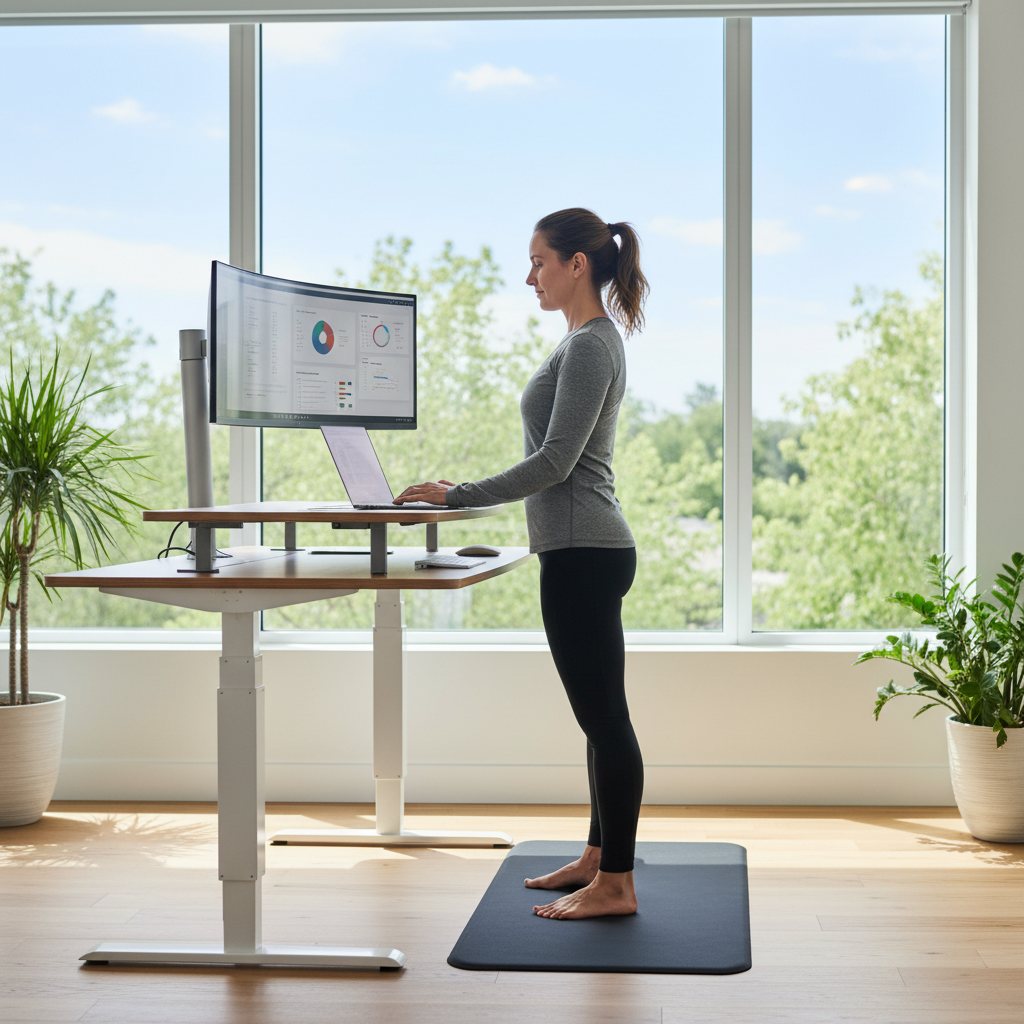
Supporting gear. An anti-fatigue mat makes standing (and slow walking) far more comfortable on your feet, knees, and lower back. A monitor arm lets you keep your screen at true eye level whether you’re sitting or standing, which protects your neck and is the ergonomic detail most people miss.
| Product | Best for | Standout | Price tier |
|---|---|---|---|
| Buy on Amazon | Best overall value | Reliable, programmable presets | $$ |
| Buy on Amazon | Premium build | Top-tier stability, customization | $$$ |
| Buy on Amazon | Fast, easy setup | Sturdy, business-grade | $$$ |
| Buy on Amazon | Best budget | Low-cost electric sit-stand | $ |
| Buy on Amazon | Keeping your desk | No-replace sit-stand riser | $$ |
| Buy on Amazon | Standing comfort | Cushioned support underfoot | $ |
| Buy on Amazon | Eye-level ergonomics | Sit/stand screen positioning | $$ |
The ranked picks
Flexispot Standing Desk
Flexispot has become the default recommendation in the standing desk world for good reason: the brand consistently delivers a stable, programmable electric desk at a price that undercuts the premium players without feeling cheap. The lift mechanism is smooth, the memory keypad lets you save your seated and standing heights, and the frames are widely available in single- and dual-motor versions so you can match the build to your monitor load and budget.
For most desk workers, this is the sweet spot. You get the genuinely useful features (one-tap presets, a solid height range, a sturdy frame) without paying for boutique-level customization you may never use. Assembly is straightforward, and the ecosystem of compatible tops and accessories makes it easy to grow your setup over time. If you want one desk that simply works and pairs well with a walking pad, start here.
Pros
- Excellent value for the feature set
- Programmable memory presets
- Single- and dual-motor frame options
- Big accessory and top ecosystem
Cons
- Single-motor versions wobble more at full height
- Finish feels less premium than top-tier rivals
Price tier: $$ (mid-range)
Buy on AmazonOpens the product page on Amazon, where you can see the current price and delivery options.
Uplift Standing Desk
If stability and long-term customization matter more to you than saving money, Uplift is the upgrade pick. These desks are known for being rock-solid even at standing height, with a heavy-duty frame that barely flinches when you lean on it or type aggressively. The range of desktop sizes, materials, and accessory options is among the deepest available, so you can dial in a workstation that fits your exact space and style.
It costs more, and you’ll feel that in the price tag. But for a daily-driver desk you plan to keep for years, the extra spend buys real durability and a refined feel. Power users with multiple monitors, heavy gear, or a large dual-monitor-plus-walking-pad layout will appreciate the headroom in both weight capacity and build quality.
Pros
- Outstanding stability at full height
- Extensive size and accessory choices
- Robust, long-lasting build
- Strong weight capacity
Cons
- Premium price
- More options can mean a longer configuration process
Price tier: $$$ (premium)
Buy on AmazonOpens the product page on Amazon, where you can see the current price and delivery options.
Vari Electric Standing Desk
Vari built its reputation on getting people standing fast, and that ethos carries into its electric desks. Setup is famously quick, the frames feel sturdy and business-grade, and the whole experience is designed to be foolproof, which is exactly what you want if you’d rather not spend an afternoon with an Allen wrench. It’s a favorite in offices for a reason.
You pay a bit of a premium for that polish and brand support, and the customization options aren’t as deep as Uplift’s. But if your priorities are a confidence-inspiring desk that arrives, assembles quickly, and just feels solid from day one, Vari delivers. It’s an especially good fit for anyone outfitting a home office who values simplicity over tinkering.
Pros
- Very fast, simple assembly
- Sturdy, business-grade frame
- Reliable brand support
- Clean, professional look
Cons
- Priced at a premium
- Fewer customization options than rivals
Price tier: $$$ (premium)
Buy on AmazonOpens the product page on Amazon, where you can see the current price and delivery options.
FEZIBO Standing Desk
FEZIBO is the brand to know if you want a true electric sit-stand desk on a tight budget. Instead of a manual crank, you get motorized height adjustment (often with a memory keypad) at a price that’s notably lower than the established names. Many models bundle in nice touches like a built-in drawer or cable management, which sweetens the value further.
The tradeoffs are what you’d expect at this price: the frame and finish aren’t as premium, single-motor versions can show more wobble at full height, and the upper height range may be tighter for very tall users. But as an affordable on-ramp to standing, or for a secondary workstation, it’s a smart way to get the core benefit without overspending. Pair it with an anti-fatigue mat and you’ve got a capable active setup for less.
Pros
- Lowest-cost electric sit-stand option
- Memory presets on many models
- Useful bundled extras (drawer, cable tray)
- Great entry point to standing
Cons
- Less premium frame and finish
- More wobble on single-motor versions
- Tighter height range for tall users
Price tier: $ (budget)
Buy on AmazonOpens the product page on Amazon, where you can see the current price and delivery options.
Standing Desk Converter (Riser)
Not ready to replace your desk? A converter is the no-commitment path to sit-stand. It sits on top of your existing surface and lifts your monitor and keyboard up to standing height, then lowers back down when you want to sit. Setup takes minutes, there’s nothing to assemble, and you keep the desk you already love, which makes it ideal for renters, shared spaces, or anyone testing whether standing works for them.
The compromises are real but manageable. You lose a bit of desk space to the unit’s footprint, the lifting motion isn’t as seamless as a full electric desk, and the keyboard tray height is fixed by the design rather than infinitely adjustable. For many people, though, the convenience and lower cost easily outweigh those quirks. It’s the smartest pick when replacing your desk isn’t on the table.
Pros
- No need to replace your desk
- Minimal setup, no assembly
- Great for renters and small spaces
- Lower cost than a full desk
Cons
- Takes up part of your desktop
- Less seamless than a full electric desk
- Smaller usable work area up top
Price tier: $$ (mid-range)
Buy on AmazonOpens the product page on Amazon, where you can see the current price and delivery options.
Anti-Fatigue Standing Mat
This is the accessory people skip and then wish they’d bought first. Standing on a hard floor for long stretches gets uncomfortable fast, and the discomfort is usually what sends people back to their chair. A cushioned anti-fatigue mat takes the pressure off your feet, knees, and lower back, and the subtle instability encourages small postural shifts that keep your legs engaged rather than locked.
It’s a low-cost upgrade that punches well above its price. Look for a mat with enough thickness to feel supportive but not so soft that you sink in, and a beveled edge so you don’t trip. If you’re also using a walking pad, a quality mat complements it by giving your feet a comfortable base during your standing intervals.
Pros
- Major comfort boost for the price
- Reduces foot and lower-back fatigue
- Encourages gentle micro-movement
- Makes longer standing sessions sustainable
Cons
- Takes up floor space under the desk
- Very soft mats can feel unstable
Price tier: $ (budget)
Buy on AmazonOpens the product page on Amazon, where you can see the current price and delivery options.
Ergonomic Monitor Arm
A standing desk solves the height of your desktop, but it doesn’t automatically put your screen at the right height for your eyes, and that gap is where neck strain creeps in. A monitor arm clamps to your desk and floats your screen exactly where it should be: top of the display at or just below eye level, an arm’s length away. Crucially, it holds that relationship whether you’re sitting or standing.
Beyond ergonomics, it frees up desk space by lifting the monitor off a stand, and it makes it easy to nudge the screen around as you change positions. If you’re serious about building a workstation that protects your posture across a full sit, stand, walk day, a sturdy arm is one of the highest-leverage additions you can make. Just confirm it supports your monitor’s size and weight and matches your mount type (VESA).
Pros
- Keeps screens at eye level in any position
- Reduces neck and upper-back strain
- Frees up desk surface area
- Easy to reposition on the fly
Cons
- Must match monitor size, weight, and VESA mount
- Heavier monitors need a higher-rated arm
Price tier: $$ (mid-range)
Buy on AmazonOpens the product page on Amazon, where you can see the current price and delivery options.
How to set up your active workstation ergonomically
Great gear only helps if it’s dialed in. Use these benchmarks to build a setup that feels good and that you’ll actually use day after day.
Set your desk height. Whether sitting or standing, your elbows should rest at roughly 90 degrees with your forearms parallel to the floor and your shoulders relaxed. Save these as your two memory presets so switching is one button press.
Position your screen. The top of your monitor should sit at or just below eye level, about an arm’s length away. A monitor arm makes this easy to maintain across both sitting and standing.
Stand on a cushioned surface. Place an anti-fatigue mat where you stand so your feet and lower back stay comfortable. Keep your weight even and let yourself shift and sway slightly rather than locking your knees.
Add gentle movement. Tuck a walking pad under or beside the desk so you can step on for a slow walk during calls and reading. Even short, easy walking intervals add up over a workday.
Ease into it. Start with short standing blocks and build up over a week or two. Alternate sitting, standing, and walking, focus on relaxed, upright posture, and if you have back, joint, or circulation issues, check with your doctor before making big changes to how you work.
Frequently asked questions
Is a standing desk really better than sitting all day?
The benefit isn’t standing itself, it’s the ability to change positions. Staying in any one posture too long is the real problem. A standing desk lets you alternate between sitting, standing, and walking, which keeps you more comfortable and active than a fixed chair-and-desk setup.
Should I get a full standing desk or a converter?
If you can replace your desk, a full electric standing desk is more stable, more adjustable, and the better long-term choice. If you want to keep your current desk, are renting, or just want to try standing first, a converter delivers most of the flexibility for less money and zero assembly.
How long should I stand at my desk each day?
There’s no magic number, but a good rule of thumb is to avoid staying in one position for hours. Rotating roughly every 20-30 minutes between sitting, standing, and a little walking works well for most people. Build up gradually rather than forcing long standing sessions on day one.
Do I need an anti-fatigue mat and a monitor arm?
They’re optional, but they make a standing setup far more livable. A mat keeps standing comfortable so you don’t retreat to your chair, and a monitor arm keeps your screen at eye level in both positions, protecting your neck. Together they’re an inexpensive upgrade that meaningfully improves the experience.
The bottom line
A standing desk is one of the simplest changes you can make to sit less and move more, especially when you treat it as part of a flexible sit, stand, walk routine rather than a license to stand rigidly for hours. Start with a reliable desk like the Flexispot, add an anti-fatigue mat and a monitor arm to make it comfortable and ergonomic, and consider pairing it with a walking pad to fold real steps into your workday. Ease in gradually, keep your posture relaxed, and let variety do the heavy lifting.